Hamfest Find – Vintage Bearcat III Scanner

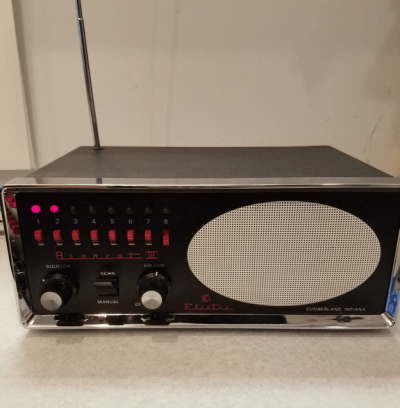
When I was kid my grandma always had a police scanner going. My brother and I thought it was pretty neat to hear the police, firemen, and ambulance talking. I can’t remember exactly which radio she had, but I do remember that it was a Bearcat, and that it had the red LEDs and there were lockout switches for each channel.

Later on when I was in high school I bought my own police scanner, a Bearcat BC70xlt. Two of the channels I had programmed were local 2m ham radio repeaters. Not having a ham radio license, my brother and I both put CB radios in our cars, as did many of my friends. We had a lot of fun with those CBs, but they sure left a lot to be desired.

We noticed that one of the kids at our high school had a lot of antennas on his car, so one day I asked about them. It turns out that he was a ham, and he told me I needed to throw away that CB and get a ham radio license, which I eventually did. That kid turned out to be a lifelong friend, we still chat on Facebook several times a week.

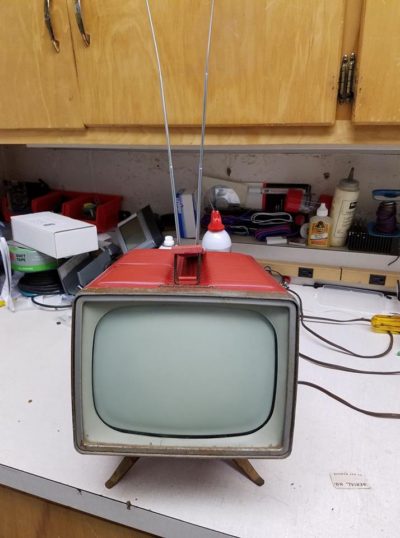
Fast forward 25 or so years later and I ran across this old Electra Bearcat III police scanner at the Cedar Rapids hamfest. It immediately reminded me of my grandma, and how her police scanner changed my life by sparking an interest in radio communications. The guy was asking $10 for it, with the original box, manual, power cord, and mobile mounting bracket. How could I pass that up?

The radio was in mint condition inside and out. No dust bunnies and very clean. The only real cleaning it needed were the knobs, which I scrubbed with a toothbrush and some Simple Green. A quick wipe down of the rest of the radio and looked great.

Of course, this being a crystal set, I knew it wasn’t going to hear any of the channels our local public safety agencies were using. Even worse, once I got it home I realized that the BC3 used optional IF boards to listen to two different bands. This radio only had one installed, and it was UHF, and I needed VHF. But I found another BC3 on eBay for a bit over $15 shipped, so I went ahead and ordered it so I could rob the IF board from it. It even had a couple of crystals that would work for me locally.

Next I needed crystals. Certainly ICM or Jan would have them. Nope. Both are out of business. Looks like it was back to eBay. Several sellers had scanner crystals, and I finally found a seller that had what I needed. I ordered five crystals for $50 shipped, a lot more than I really wanted to pay, but what good was this thing without the crystals? Once they arrived I installed them and sure enough, I heard the fire department being paged out and the police dispatcher as well.

I put the scanner on the bench and tested with an IFR-1100 service monitor and the receiver is actually quite hot, at about 0.2uV of sensitivity. Not bad for a scanner that’s nearly 40 years old! I considered re-capping it, but since it was working just fine I decided not to bother.

This unit is now living in my basement bar, right next to some 70s vintage pinball machines. It looks right at home there, and every time I see it I can picture grandmas scanner on top of her refrigerator, and I’m reminded of childhood visits to grandma and grandpas house.

No, I will not fix your computer

If you suspect you are infected with Crypto malware (Cryptowall, Cryptolocker, TeslaCrypt, etc) DO NOT follow this guide!

This guide is heavily based on a Reddit post by: /u/cuddlychops06. I have reviewed it and given it two thumbs up!

Purpose & Scope of this Guide:

This guide is designed to assist you in removing malware from an infected system that successfully boots. If you perform the following steps exactly as described, this will solve your problem in over 90% of scenarios. That said, not all malware is created equal, and there will be times that this guide fails in removing malware. It is recommended to only accept advice from a “Trusted” technician. (W0HC is a CompTIA A+ Certified Technician). This guide is written in layman’s terms so that most people will be able to understand it with ease.

Disclaimer:

The following instructions are recommendations only. You take full responsibility for any steps you choose to perform on your computer. While the following recommendations are performed without issue on countless machines, there is always a risk of damaging your Operating System or experiencing data loss on any machine. It is solely YOUR responsibility to save all work and back up any and all important data on your system before proceeding. Also note that once a computer has been compromised with malware, it should not be considered clean until a complete reformat has taken place.

Malware Remediation Steps:

Before proceeding, go into your browser’s extensions and remove all suspicious items. Also go into your browser’s settings and remove any default search providers and unusual homepages. If you are unsure how to do this, proceed to Step 1.

Download and run the following tools in this order. Run all tools unless otherwise instructed. All tools should be run in Normal Mode (not Safe Mode) unless you are unable to boot Normal Mode, or the scans fail in Normal Mode. All tools must be run under an Administrator account. Do not remove any tool-generated logs in the event a helper needs you to post them to further assist you.

1) Run rkill.com. Sometimes it takes a few minutes to finish. Do not reboot when done.

  • Kills running malicious processes
  • Removes policies in the registry that prevent normal OS operation
  • Repairs file extension hijacks

2) Download an updated copy Malwarebytes Anti-Malware. Turn on the “Scan for Rootkits” option.

Then, run a “Threat Scan”


  • Successfully removes the vast majority of infections
  • Has an industry-leading built-in rootkit/bootkit scanning engine
  • Has built-in repair tools to fix damage done by malware

3) Run ADWCleaner using the “Scan” option. Then press “Cleaning” when finished and allow it to reboot your system.

  • Removes majority of adware, PuPs, Toolbars, and Browser hijacks
  • Fixes proxy settings changed by malware
  • Removes certain non-default browser settings

4) Run Junkware Removal Tool and allow it to finish. Reboot your computer upon completion.

  • Removes adware, PuPs, Toolbars, and Browser hijacks other tools miss
  • Good at removing unneeded AppData directories left behind by infections


Optional, Advanced Step (only run if previous tools fail to solve problem):

5) Run RogueKiller

  • Hereis what RogueKiller can do:

Please note: If malware has prohibited you from browsing the web or downloading files, you can try running the NetAdapter Repair Tool with all options checked which will attempt to restore your internet connection & default browser settings. You may have to download these tools on another computer and move them to a flash drive that you can plug into the infected machine.

If you have run all of the above tools successfully, you should be malware-free.

Follow-up Steps (highly recommended):

  • Using a computer that has not been infected, change passwords to all your online accounts.
  • Consider enabling two-factor authentication on supported apps & sites.
  • Revoke app-specific passwords to things like gchat, Facebook, etc
  • Consider resetting your Windows user account password
  • Install a better anti-virus.


Yaesu G-800SA Rotor not turning when cold

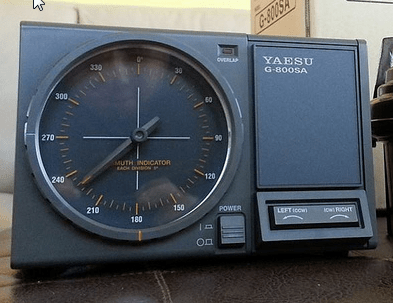
Yaesu G-800SA Rotor ControllerI’ve had a Yaesu G-800SA Rotor on my tower since I built it in 2009. I mostly like it, especially the nice big dial on the controller. The fact that it only needs 4 wires to operate is also a plus.

One thing I don’t like about this Yaesu Rotor is that it’s very cold blooded. I tend to take a bit of time off work over the holidays, so I like to mess around on the ham bands. Unfortunately, here in Iowa it’s often quite cold outside at this time of year. Today, for example, overnight we had a low of -4°F, and as of lunchtime it’s only reached 10°F.

It seems that when the temperature is cold, below about 10°F, the rotor stops turning. I haven’t yet been able to determine if this is a rotor issue, or some other problem related to my installation. I’m not very inclined to climb the tower when it’s cold out to see where the issue lies!

I’ve been pondering if there’s a way I could warm the rotor up a little bit, assuming I determine the issue is in the rotor. Or maybe it needs a different type of grease more suited to the cold Iowa winters.

In any case, while typing this post the rotor warmed sufficiently that I now turns. Time to check out the bands!

73

Smoking Meat

Over the past several years I’ve taken up a new hobby, totally unrelated to amateur radio, but closely related to ham. Smoking meat!

This topic is a bit RF related. Back in 2008 we had a new transmitter installed at work, and we had problems with it from day 1, so the manufacturer sent us a contract engineer to look into the problem. This guy went on and on about smoking ribs. I love ribs, and never really mastered grilling them on a charcoal grill. Anyway, he convinced me that I needed an actual smoker.

I started off with a cheap $50 electric smoker that was on clearance at Home Depot, and it worked well enough that I used it until a few months ago when Amazon had a special on a Masterbuilt Electric Smoker. I pulled out my credit card and two days later that bad boy was on my front step.
I mostly smoke Baby Back Ribs, which I generally buy at Sams Club, which is a couple dollars a pound cheaper, unless the local butcher has them on special. I use the 2-2-1 method. Two hours in the smoke, two hours wrapped in foil with a bit of apple juice and back on the heat, and then one hour unwrapped to firm them up a bit. I try to keep the temperature around 225F. Low and slow.

Always remove that shiny, tough membrane from the back of the ribs. Then rub them with your favorite BBQ rub. The recipe I use is a tightly held secret. They come out so good you don’t need BBQ sauce.

I’ve also smoked turkeys, and tried a few briskets. The briskets take a lot of patience, as you need to smoke them very slowly at low temperatures. I haven’t really mastered them yet.

My wood of choice when I’m smoking has been Apple. I’ve been told that Hickory and Mesquite and be a little too strong, but I will be experimenting with them and Pecan this summer. I’m also going to branch out and smoke some other meats, especially chicken. I have ten pounds of chicken hindquarters in my deep freeze that I bought on special over the winter, and I’m really looking forward to smoking them if this Iowa weather ever warms up enough that can sit outside and enjoy the process of smoking them. A nice warm day, lots of smoke, a book, and beer in the hand is what I’m looking forward to! And then plenty of friends to enjoy the results with!

Today I ran across a handy chart Wood Smoking Flavor Chart, so if you’re interested in smoking meat that will help you choose which wood to use.

Have fun, and enjoy a tasty meal!

Completed Tower

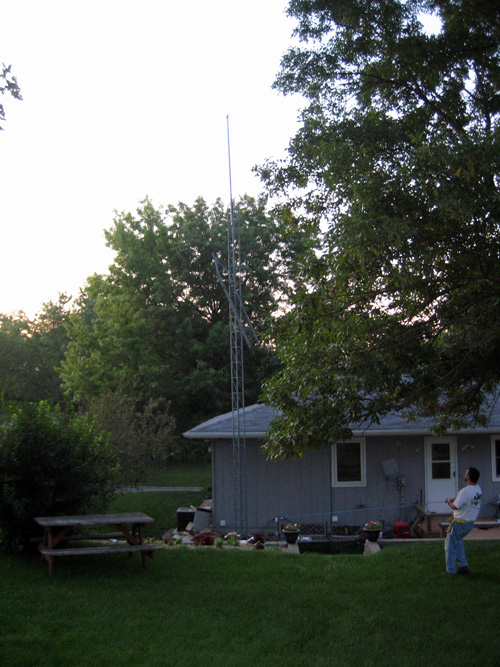
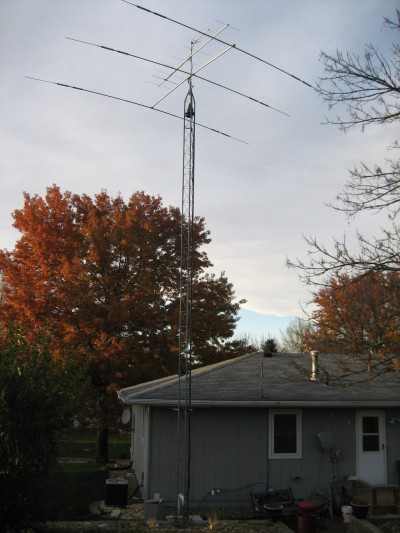
I just noticed that I’ve never posted a picture of the completed tower. Here it is.

Where the heck is W0HC?

Sometimes life gets in the way of Ham Radio.  Such has been the case at the W0HC QTH.

In the past month I've mostly finished the tower.  Just some minor odds and ends to tie up before the snow flies. The grounding panel is built, the Polyphasers are installed. Coax is run. The tree is trimmed. And the beam works! I was able to work a station in Croatia over the past weekend, and made a few stateside contacts on 10m. The beam is awesome! I'll try to get some pictures of the finished tower, and the grounding panel soon.

As for life, it's just been busy. A weekend on the road, continuing DTV conversion stuff at work, getting all the power equipment ready for winter, etc.  And we are now involved in a FIRST Lego League team, which I'm excited about.  It's pretty neat to see a group of 9-14 year olds getting excited about engineering, even if they don't yet realize that it's engineering.  Right now they are researching lots things about vehicles, like how tracks are used on tanks and other heavy equipment, alternative energy sources, and other things of that nature.  And they are having fun building with Legos!  We have a group of about 15 kids, several of which are girls.

I'm still messing around on the side with some ATV stuff.  I have my modulator working, and have a couple of small amplifier modules sitting on the bench waiting for me to hook them up and try them out.  The main thing that's slowing me down is still the lack of a high power amplifier.  But, I may have some leads on a few, ranging from 100w to 400w. That should do nicely!

Mostly Done

The tower is now mostly done.

The HF antenna is up, as are the 2m and 70cm yagis.  The rotor is installed, and rotates.  Mostly. There’s a tree in the way of the HF beam, so it can’t rotate.  I have a guy with a boom truck coming to fix that little issue. I still have coax runs down the tower to make.  And install some 3″ conduit for the coax entry.  And the lightning protection box.  And build a rotor protector.  Polyphaser wants entirely too much money for theirs.

I had planned to run the conduit today, and mount the box for the lightning protectors, but I got called to go to work instead.  Since work pays the bills, and it should be overtime, I’m not complaining.

I came up with a simple system for grounding the antenna coax at the bottom of the tower.  I’ll be working on that a bit more to get it perfected, then I’ll post some info and pictures when I actually get to that stage on the tower.

Tower Grounding

Here's a brief summary of the grounding on my tower as it stands today.  It's not perfect, it's not even ideal.  It's a major compromise.

I ran a 2" copper strap from one tower leg to a ground rod about 20' away.  The strap is buried underground, but only about 4 inches deep.  The reason it is so shallow is due to limestone being 6" below grade.  The ground rod is a standard 5/8" diameter copper clad rod, 8 feet long, made by Erico.  The connection to the tower is a #2 copper wire pigtail that was brazed to the strap with Harris Stay-Silv 5 brazing rod, the wire is then clamped to a tower leg with a bronze ground clamp.  I purchased the brazing rod at a local welding supply house.  The connection to the ground rod uses a similar pigtail, which is then Cad-Welded to the ground rod using a "One-Shot" purchased from Tessco.

A second ground wire is connected to the tower the same way, then the strap runs to a ground rod, connected with another pigtail.  The strap continues on and will eventually be connected to the single point ground for the coax entry panel, which is still a work in progress.  There just hasn't been enough time…

My main electrical service is grounded, again via a #2 copper wire, to an existing 8' ground rod at the electrical meter.  There I have a 4-way Cad-Weld One Shot, with a #6 wire running to another ground rod for the telco ground, a #6 going to yet another ground rod, and a #2 going to the ground rod mentioned in the previous paragraph, this wire provides the REQUIRED bonding connection between all the services and the tower.  It can not be stated enough that this connection is extremely important.  Do not skip the bonding step.

The electrical service panel is protected with an LEA whole-house surge protector.  The telephone line has secondary protection after it enters the house, just inches from my electrical panel.  I'm using Polyphaser IS-MPT-200 protectors.  I like these because they are cheap, and they seem to work very well. [edited to add: I've been told these are no longer available]  I have a small punch-down block for the phone lines so these work nicely for me.  I'm using two because my voice and ADSL come into the house on separate pairs, with a telco provided splitter at the network interface device. All coax will be protected by Polyphaser units, and I'm looking for a suitable rotor protector.  Polyphaser makes one, but its rather pricey at around $150, half the price of the entire rotor!  ICE also makes one, but I haven't bit the bullet and ordered one yet.

At some point, I'll draw a picture of all of this so it makes more sense.

One additional thing I did was to have my entire re-bar cage welded together, and welded to the anchor bolts for the tower.  In the event of a lightning strike, their will be no opportunity for arcing inside the concrete foundation.  This also allows the foundation to act as a "Ufer Ground".

There will be more to be said about lightning protection later on.

Stacking Tower

I'm way behind on updating here.. The tower itself is up.

Homebrew Ginpole

I home brewed my ginpole using an actual gin pole head I bought on ebay.  I added a 10 foot section of 1" galvanized pipe.  I didn't buy any brackets, so I used u-bolts to attach it to the tower.  Not recommended.  And I would much prefer about 12' of 6061-T6 aluminum pipe to the galvanized. goinupgoinup2

I still don't have my house bracket built.  I'm hoping the tower is a bit sturdier once I do. I'm waiting on parts from Cushcraft for the A3S, it sounds like they should be shipping early next week.  My mast pipe has arrived.  I wanted a seven foot pipe, and the 1 5/8" galvanized pipe I had is very heavy and would be a real pain to get up the tower.  I opted for a seven foot piece of Schedule 80 6061-T6 extruded pipe.  I found a very reasonable price for it, around $40, and was able to get a couple pieces of brass from the same supplier.  More on those in a future post.

So at this point I'm ready to install the rotor and mast, and the 2m beam.  The grounding is substantially complete, or as complete as it will get at this time considering that I'm way over my allotted budget for this project.  I think it will be "good enough", although it is certainly not ideal, but considering the rock it's hard to get an ideal grounding system installed.  I found some major issues with my current grounding that were fixed.  I'll post more about the grounding in the future. Hopefully I'll get that house bracket built this weekend.

Tower Construction – Part 3

Just a few more updates.

Tower Base Bottom 10 Foot Section Two sections after a coat of Cold Galvanizing Compound The Cedar Rapids Hamfest is Sunday.  I will be on the lookout for a nice 2m Yagi to use on SSB. Tomorrow I will be working on tower grounding.

w0hc.com is licensed under Attribution-NonCommercial-ShareAlike 4.0 International